If you’ve ever needed to connect two buildings to the same network, you’ve probably been told the only real option is trenching — digging up the ground, laying fiber, and paying tens of thousands of dollars for a project that takes weeks.
That used to be the standard answer. It isn’t anymore.
A point to point wireless bridge lets you do the same thing — fast, stable network access between two buildings — without tearing up the property. We install these systems nationwide for businesses, ranches, warehouses, marinas, and multi-building residential properties, and in most cases it’s both faster and dramatically cheaper than trenching.
Here’s how it actually works, and when it’s the right choice.
What a Point to Point Wireless Bridge Actually Is
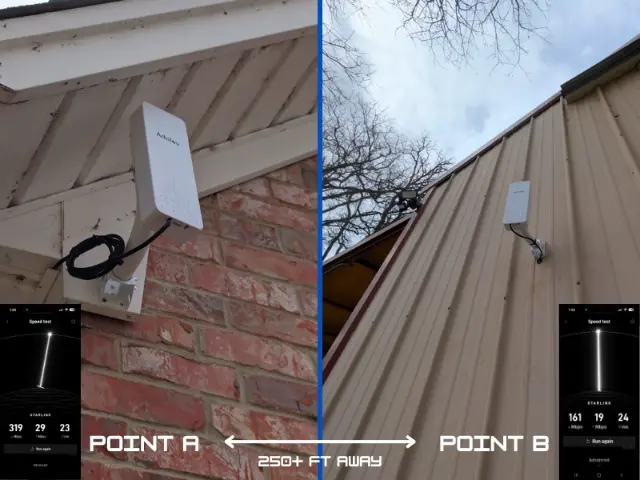
A point to point wireless bridge — usually shortened to “PTP bridge” — is a pair of small antennas mounted on two buildings, aimed directly at each other. The two antennas create a dedicated wireless link between them, essentially acting as an invisible cable through the air.
One antenna transmits, the other receives, and together they carry network traffic — internet, security camera feeds, VoIP phones, file sharing, anything — between the two locations.
Unlike standard Wi-Fi, a PTP link is focused and directional. It isn’t broadcasting to everyone in range. It’s a private, high-speed connection between exactly two points.
How a Point to Point Wireless Bridge Compares to Trenching Cable
The old method — running fiber or copper underground — works, but it comes with real costs:
- Permits and engineering reports
- Excavation, conduit, and surface restoration
- Disruption to driveways, landscaping, or parking lots
- Weeks or months of project time
- Long-term repair risk if the line is later cut by a backhoe
A wireless bridge for business eliminates most of that. The antennas mount on existing structures, the equipment can be installed in a single day, and there’s nothing buried that can be damaged later.
Real-World Use Cases
PTP bridges aren’t just for tech-heavy environments. We install them for:
- A warehouse and a separate office building on the same campus
- A main house and a detached guest house, barn, or workshop
- A ranch headquarters connecting outbuildings spread across acres
- Two retail locations on either side of a parking lot
- Construction sites needing temporary high-speed connectivity
- Marinas connecting docks, offices, and fuel stations
Anywhere you’d normally run cable between two buildings, a point to point wireless bridge is worth considering first.
What's the Best Point to Point Wireless Bridge for Your Property?
The honest answer is that there isn’t a single “best point to point wireless bridge” for everyone. The right unit depends on three things — distance, required speed, and environment.
For short-range commercial installations (under a quarter mile, clear line of sight), mid-tier outdoor units from Ubiquiti, Cambium, or TP-Link deliver gigabit-level throughput at modest equipment cost.
For long range point to point wireless bridge scenarios (a mile or more), licensed or higher-grade unlicensed equipment with larger dish antennas is required. Speeds remain strong, but mounting, alignment, and weatherproofing become much more critical.
For harsh-environment installs — coastal marinas, mountain ranches, industrial yards — outdoor-rated hardware with hardened enclosures and surge protection is non-negotiable.
We size and spec every install to the property rather than recommending the same hardware to every customer. Buying a top-of-the-line unit for a 300-foot link wastes money; buying an entry-level unit for a 5-mile link wastes the entire investment.
Choosing a Point to Point Wireless Bridge Outdoor System
An outdoor PTP system has three key requirements beyond what an indoor link needs:
- IP-rated enclosures that survive rain, snow, UV, and temperature swings
- Surge protection and grounding on both ends to prevent lightning damage
- Rigid mounting hardware that holds alignment in high winds
A point to point wireless bridge outdoor install that skips any of these will work fine for a season and then start failing in ways that are hard to diagnose. We see it constantly with DIY installs.
How Far Can a Point to Point Wireless Bridge Reach?
For most commercial installations, PTP links comfortably cover anywhere from a few hundred feet to several miles. Higher-grade equipment can push reliable connections out to 10 miles or more in the right conditions.
The single most important factor is line of sight. The two antennas need a clear, unobstructed path between them. Trees, hills, and buildings in the path will reduce or block the signal.
Speed and Reliability
Modern PTP equipment delivers speeds that surprise most people. Gigabit-level throughput is standard for shorter links, and even longer-range setups regularly deliver speeds that easily handle multiple users, security cameras, VoIP systems, and cloud applications at the same time.
Latency is low enough for video calls, real-time monitoring, and remote desktop work. For most businesses, a properly installed PTP bridge performs as well as a wired connection.
What a Real PTP Wireless Installation Involves
A good PTP wireless installation isn’t just bolting antennas to a wall. It involves:
- A site survey to confirm line of sight and identify mounting locations
- Selecting equipment matched to distance, speed, and weather conditions
- Mounting hardware that stays aligned in wind and storms
- Cable runs from each antenna to network equipment inside each building
- Configuration, encryption, and integration with existing networks
- Testing under load to confirm the link performs in real-world conditions
When any of these are skipped, the result is a flaky link that drops in bad weather or under load — and that’s the version of PTP that gives the technology a bad reputation.
When a Point to Point Wireless Bridge Is the Wrong Choice
PTP is a great fit for most multi-building scenarios, but not all. It isn’t ideal when:
- There’s no clear line of sight and no way to create one
- Buildings are too far apart for any commercially available equipment
- Local regulations restrict outdoor antenna installations
- The application demands guaranteed bandwidth far beyond what wireless can deliver
In those cases, fiber or hybrid solutions may still be the right call. A good installer will tell you that up front.
Frequently Asked Questions
How much does a point to point wireless bridge cost? For most small business installs, equipment plus professional installation typically runs a fraction of trenching cable — often 70 to 90 percent less.
Does weather affect a point to point wireless bridge outdoor install? Properly installed outdoor PTP gear handles rain and snow well. Extreme conditions can temporarily reduce throughput but rarely cause outages on well-installed links.
What is the best point to point wireless bridge for long range? For a long range point to point wireless bridge (one mile or more), look for hardware with larger dish antennas, licensed-band options where appropriate, and proven outdoor performance ratings.
Can I install a PTP bridge myself? The hardware is available, but alignment, mounting, weatherproofing, and network integration are where most DIY installs fail.
Is a point to point wireless bridge secure? Yes — commercial PTP links use AES encryption and are far more secure than typical Wi-Fi networks.
AFTECHS installs point to point wireless bridges nationwide — for businesses, ranches, warehouses, marinas, and multi-building residential properties. Every project starts with a free site evaluation so you know whether a PTP bridge will work, what speeds you can expect, and what the install will involve.
If you’ve been quoted tens of thousands of dollars to trench cable between two buildings, talk to us first. There’s a strong chance you don’t need to dig at all.